

2016 Supra Vision Screen Frozen in the Center? The 7 inch HV700 Dead Zone Fix

The center of the 7 inch Supra Vision touchscreen freezes up and stops responding, leaving large dead zones right where you tap most. This is the Murphy HV700 platform, and this exact failure pattern is one of the most common complaints we see on Supra boats. Here is what is happening, and how to fix it.
In this guide
- What the 7 inch Supra Vision HV700 is, and the part number it carries (78350632)
- The 4 failures we see most: frozen center, dead zones, ghost touch, and LCD defects
- Why the touch controller degrades and how to send yours in
- What the rebuild upgrades, and how to fix yours with mail-in repair
What Is the Supra Vision Touchscreen?
The 7 inch Murphy HV700 helm display
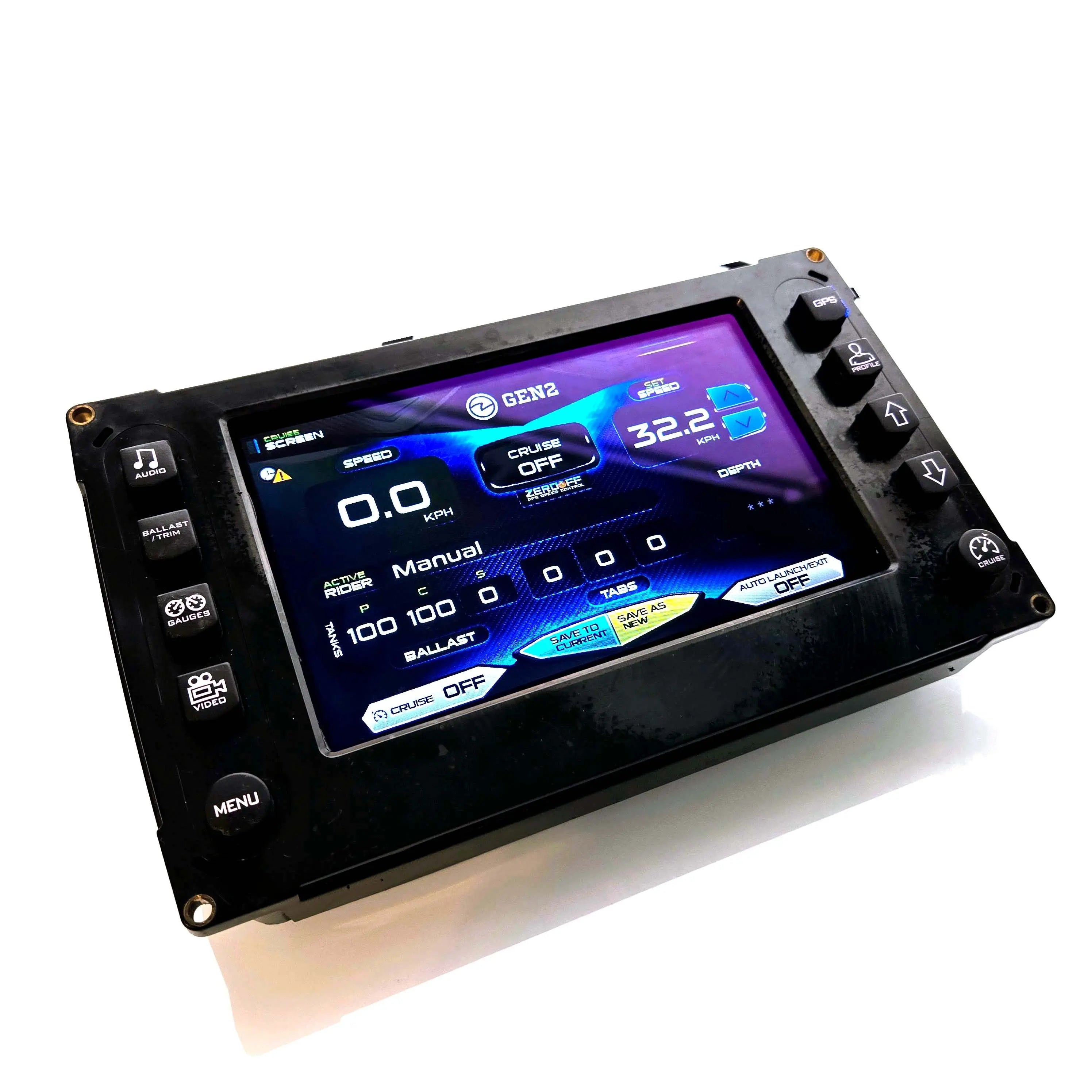
The 2016 Supra Vision uses the 7 inch Murphy HV700 touch display at the helm. Built by Murphy / Enovation Controls and branded as the Supra Vision system, it controls ballast, surf settings, speed, audio, lighting, and most of the dash functions through a single glass panel.
When it starts failing the boat is usually healthy. What breaks down is the touch controller and the optical bond inside the display assembly. The boards, housing, and wiring are typically fine, which is why the original unit can be rebuilt rather than replaced at a fraction of the cost.
The HV700 platform also appears on Mastercraft, Centurion, Tige, Nautique LINC 2.0, Regal, Premier, Bayliner, Harris, and South Bay models from roughly 2012 to 2018.
The 4 Most Common Failures
What goes wrong on the Supra Vision HV700
The center and middle zones of the touch grid tend to go first on the HV700, which is exactly where most controls sit. Dead zones and a frozen center are the signature complaints on Supra Vision boats.

❌ Frozen Center and Dead Zones
The signature failure. The center of the screen stops responding entirely, leaving you unable to tap the controls you use most. Dead zones spread outward from the center as the touch controller continues to degrade.

🔮 Ghost Touch and Phantom Inputs
The screen registers presses no one is making. Surf settings flip, menus open on their own, and the cursor jumps. Ghost touch tends to appear alongside dead zones as the controller ages.
🔴 LCD Defects
Black spots, stripes, fading, or random color bars appear as the panel ages. Often shows up after the touch issues begin, as the same conditions affect the LCD and its connections.
🌓 Dim or Dark Backlight
The screen washes out in direct sun or fades to barely readable. Backlight output degrades over thousands of hours and can fail completely over time.
🎦 Real 2016 Supra Vision HV700 Repair
A 2016 Supra Vision HV700 in our shop with a frozen center and unresponsive dead zones across the touch grid. Watch the diagnosis and what the rebuilt display looks like.
Why the HV700 Develops Dead Zones
The touch controller, not the boat computer
The HV700 was well built when it was new, but the touch controller and optical bond were not designed for what a surf boat helm sees season after season. The same forces work against it every year:
- Aging touch controller chip, the internal capacitive touch IC becomes increasingly noise sensitive after five to seven years, and the center of the panel, which sees the most taps, tends to degrade first.
- Direct UV at the open helm, full sun breaks down the adhesive bond and the protective layers above the sensor grid over time.
- Heat cycling, the unit heats under use and cools in storage, and repeated expansion stresses the bond and the sensor connections.
- Vibration, hull and engine vibration works the internal connections loose over thousands of hours on the water.
How to Remove and Send In the Display
Standard hand tools, about 20 minutes
The HV700 requires special equipment to separate the glass from the panel, so this is a mail-in repair rather than a DIY kit. Removing the unit from the dash is straightforward.
- 1Disconnect the boat battery before any work at the helm.
- 2Remove the mounting fasteners holding the display housing to the dash. Set the hardware aside to reuse on reinstall.
- 3Disconnect the wiring harness from the back of the unit.
- 4Slide the display forward out of the dash with its bezel attached and pack it as a complete unit.
- 5Ship it in with the prepaid UPS label we email after checkout.
Real Customer Result
2016 Supra Vision, frozen center and dead zones fixed
A Supra Vision owner sent in an HV700 with the center of the screen completely frozen and dead zones spreading across the most-used controls. OEM HV700 units are obsolete and have been quoted in the thousands when they can be sourced at all. He shipped the unit in and we returned it within 3 business days with a new LCD and digitizer assembly, fresh bonding, and a brighter backlight. Every surf profile and setting came back exactly as it was.
Why Our Rebuild Outlasts OEM
What the HV700 repair upgrades on the original
Replacing an OEM HV700 with another OEM HV700, if you can even find one, means paying for the same touch controller that already failed. Our rebuild upgrades the parts at the root of the failure:
How to Fix Yours
Mail-in repair, returned in 3 business days
The HV700 is a mail-in repair only. Ship us the unit, we rebuild it with the upgraded assembly, and send it back ready to reinstall.

HV700 Mail-In Repair
Ship with a pre-paid UPS label. We replace the LCD and digitizer assembly, reseal the unit watertight, test, and return within 3 business days. From $2,200. Pay after repair.
Order HV700 Mail-In →Free Diagnostic
Send a photo of your display and your year and model. We will confirm the platform, identify the failure, and recommend the right repair path. No commitment.
Start a Chat →Stop the dead zones and get back on the water
Fix Your Supra Vision HV700
Mail in your 2016 Supra Vision HV700 display. Back in 3 business days with a new touch controller, anti-delamination bonding, a brighter LED, and every surf profile preserved.
Order HV700 Repair →